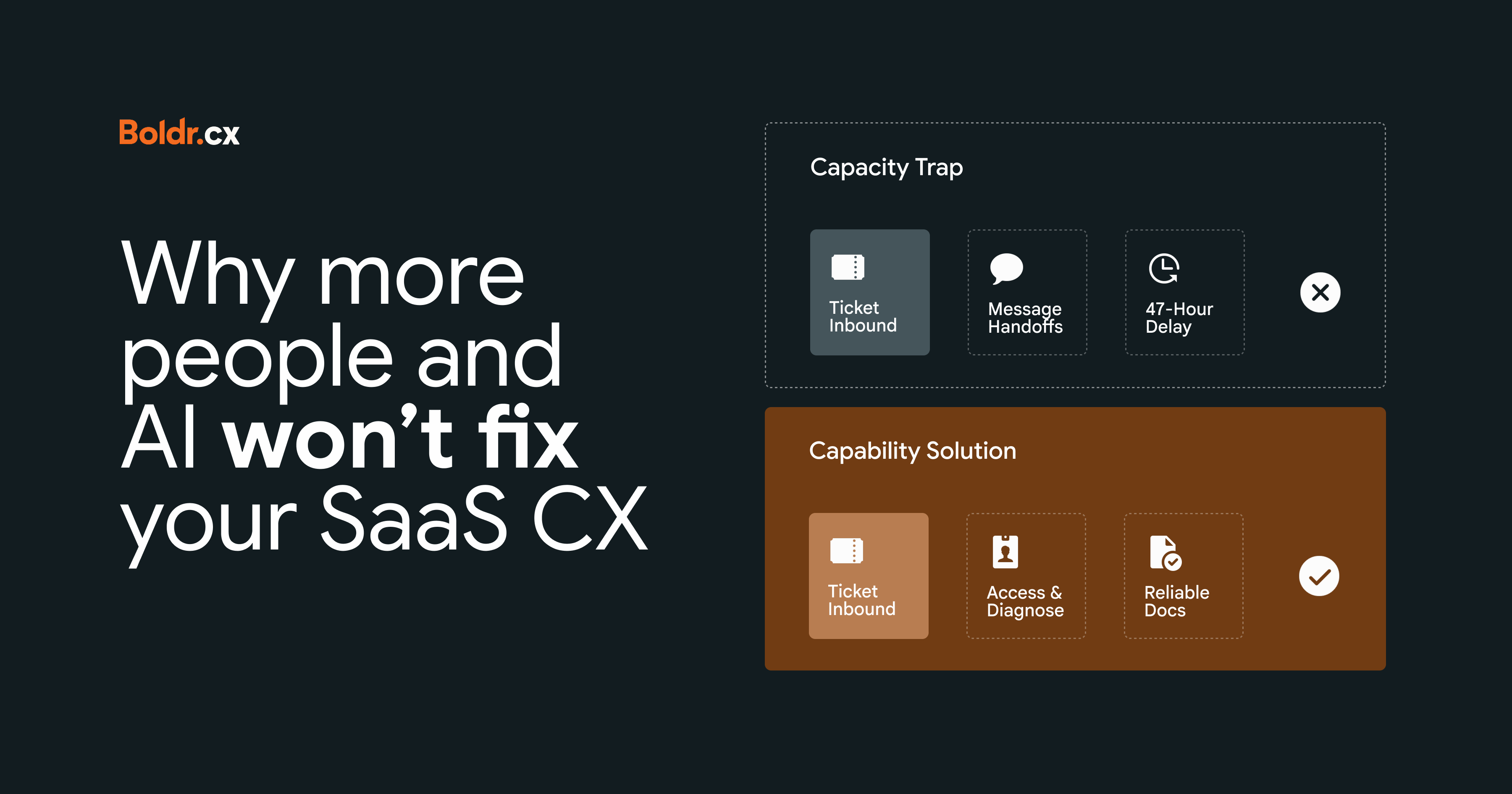
Here's how to figure out whether you're dealing with a capacity problem, a capability problem, or a bit of both.
There's a particular kind of optimism that comes with getting approval for more CX headcount. The backlog is growing, response times are slipping, and your team is working harder than ever. You finally get the green light for a few additional hires, and everyone breathes a little easier.
Fast-forward three months. You've got a bigger team, a higher payroll, and a backlog that seems remarkably unbothered by your investment. Engineering is still being pulled into the same customer issues, your most experienced people are still the unofficial helpdesk for the helpdesk, and somebody has suggested hiring again. Which, to be fair, is one way to keep the recruitment team busy.
It's a common challenge for growing SaaS companies. Products get more complicated, customer expectations change, and the CX team starts feeling the pressure. Hiring looks like the logical response. And now AI has joined the conversation, promising to take a pretty generous portion of that work off everyone's hands.
Both can be genuinely useful. But before you spend money on either, it's worth asking whether the problem is really a shortage of people, or whether the people you already have are spending far too much time fighting the way your operation works.
Is your CX team actually understaffed?
Surely if there's more work than the team can handle, you need more people? Possibly. But a growing backlog doesn't tell you much about why the work is piling up.
Imagine two SaaS companies with roughly the same backlog. At the first company, the team is handling a steady stream of straightforward questions. Demand has increased, conversations are being resolved efficiently, but there just aren't enough available hours to keep up.
At the second company, incoming volume hasn't changed much. However, the product has become more complicated, documentation is unreliable, and a growing percentage of customer issues need engineering involvement. Both companies have a backlog problem; only one has an obvious staffing problem. That's the difference between capacity and capability.
Capacity and capability: same symptoms, different problems
-
A capacity problem happens when the amount of work genuinely exceeds the time available to complete it.
-
A capability problem happens when the team or operating model isn't equipped to handle that work efficiently or independently.
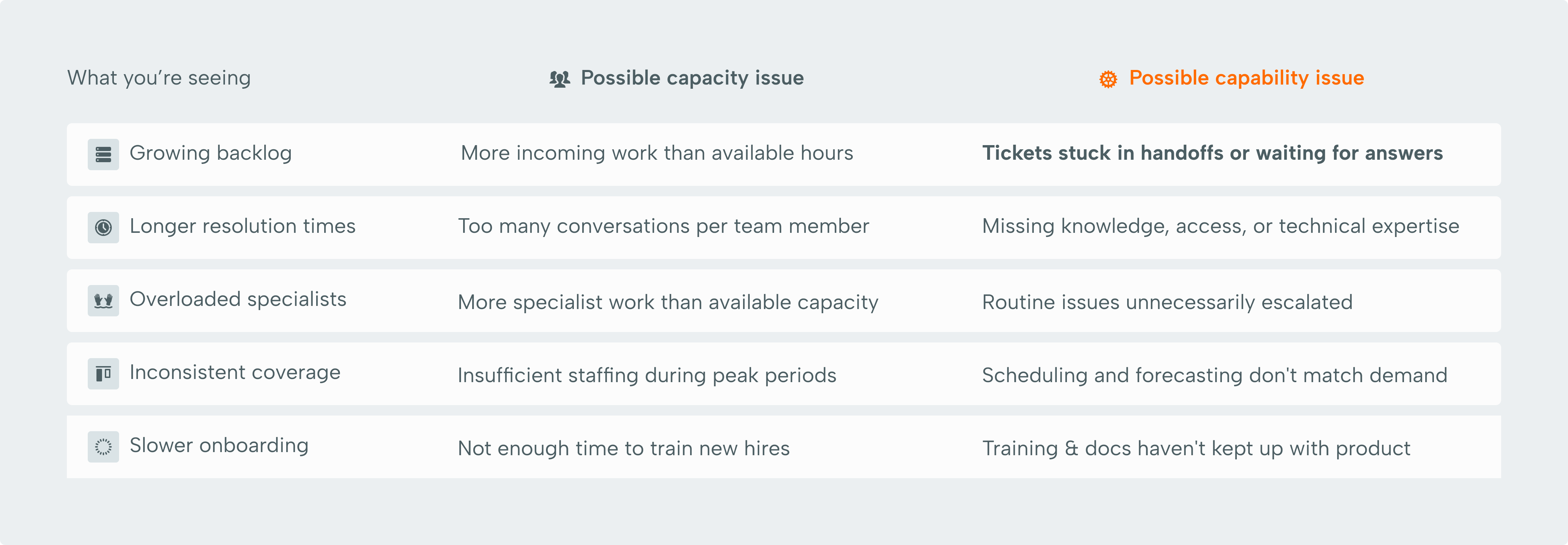
These problems can overlap; your team might genuinely have too much work and be spending far more time on that work than necessary. That's why it's important to understand what's creating the pressure before deciding how to relieve it.
Five things to investigate before adding headcount
If your CX team is struggling, one of the most useful things you can do is follow a few customer issues from the moment they arrive to the moment they're resolved. And we mean what actually happens, including the Slack messages, internal handoffs, searches through outdated documentation, and occasional desperate appeals to the one person who knows how everything works.
1. Where is the time actually going?
Resolution time is useful, but it doesn't tell you how much of that time was spent actively solving the customer's problem. A ticket might remain open for two days even though the actual troubleshooting took twenty minutes. So where did the other 47 hours and 40 minutes go?
Maybe the frontline team was waiting for engineering. Perhaps someone needed access to a system they didn't have permission to use. Or the answer existed somewhere in the company's documentation, just apparently not anywhere a reasonable person would think to look.
Take a sample of recently resolved tickets, especially those with unusually long resolution times, and examine where they spent their time. Look for recurring delays: waiting for another department, searching for information, unnecessary transfers, or repeatedly asking customers for details they've already provided.
You might find that your team spends more time trying to get into a position to solve problems than actually solving them. If that's the case, adding more people could give you a larger team of people waiting for the same exact things.
2. Which issues keep reaching engineering?
Engineering involvement is perfectly normal in SaaS support, but there's a difference between investigating an unusual technical defect and repeatedly answering questions the CX team should be equipped to resolve.
Start by looking at the categories of issues being escalated. Are they genuinely complex? Or are they reaching engineering because the frontline team lacks the technical knowledge, system access, or troubleshooting guidance to take them further?
If every occurrence requires an engineer to investigate from scratch, you may have a technical support capability gap. Better diagnostic documentation, clearer escalation criteria, or stronger technical expertise within CX could reduce that dependency.
And when engineering does need to get involved, the handoff matters. There's a world of difference between receiving a well-documented escalation with reproduction steps, account details, and troubleshooting already completed, and getting a Slack message that essentially says, "Hey, can you look at this?"
One gives engineering something useful to work with; the other gives everyone another conversation to manage, usually followed by several more conversations to establish what the original conversation was about.
3. Does your coverage match when customers actually need help?
You can have enough people overall and still have a coverage problem. Maybe most of your team works during North American business hours, but your European customer base has grown considerably. Or weekend demand has increased while your scheduling model still treats Saturday like nothing interesting ever happens.
Look at incoming volume by hour, day, region, and issue type; then compare that demand with actual staffing availability and the skills required to handle it. Having someone online at 2AM is useful; having someone online who can actually resolve the customer's issue is considerably more useful.
If every technical problem still has to wait eight hours for a specialist to start their shift, you've got a gap worth investigating. The customer probably isn't going to be impressed by the fact that someone was technically available to tell them they'll have to wait until morning. You might discover that additional hiring is necessary, but you might also find that a different shift structure, better forecasting, or a more thoughtful distribution of technical expertise would make a bigger difference.
5. Are the same customer problems coming back?
Sometimes CX teams spend a surprising amount of time getting very good at resolving problems that probably shouldn't keep happening. A confusing onboarding step generates repeated questions. A product change creates the same misunderstanding across hundreds of customers. An integration issue produces a steady stream of support conversations.
The team learns how to handle each one, creates a workaround, and moves on to the next customer.
And then the next one. And the next. Eventually, you've got an efficient process for dealing with something that could potentially be fixed at the source. Adding capacity might help manage those conversations, but eliminating the recurring issue could reduce the demand itself. Look for repeat-contact patterns and the issues generating disproportionate amounts of work.
Where AI fits into all of this
For SaaS companies handling large volumes of predictable questions, automation can make a meaningful difference. But the operational impact depends on what you're automating, how reliably it works, and what happens to everything it doesn't handle. While AI can take a lot of work off your team's plate, it can also change what's left on that plate pretty dramatically.
Fewer tickets doesn't necessarily mean less work
Imagine your AI implementation successfully handles a large share of password resets, basic account questions, and straightforward product guidance. Now look at what's left for the humans. Complex integrations, unusual configurations, billing disputes, technical troubleshooting, and customers who've already exhausted every self-service option before reaching out.
That's an important distinction when you're planning staffing, measuring productivity, and evaluating whether automation has actually reduced the team's workload. If you continue forecasting capacity using historical average handling times, you may underestimate the effort required for the new mix of work.
Your QA framework may also need attention. A scorecard designed around straightforward interactions might not tell you much about someone's ability to troubleshoot a complicated integration issue, exercise good judgment, or manage a difficult escalation. And your training program might need to prepare people for a much higher proportion of technically demanding conversations. Successfully automating the easy work is only half the story; you still need an operation capable of handling everything that remains.
Automation can also expose problems you already had
Let's say your knowledge base is outdated. Your frontline team knows this, of course, and they've developed their own ways of finding reliable answers. It's hardly ideal, but people have found ways to make it work. Then you introduce AI that uses the official knowledge base, and suddenly, those outdated answers have a much more direct route to your customers.
And unlike your experienced team members, the AI doesn’t know that the documentation is wrong. The same applies to badly defined processes. If nobody agrees on how a particular issue should be handled, automating parts of that workflow doesn't automatically make the process more reliable. You may just end up with a faster, more complicated version of the same confusion, and that’s why AI readiness involves more than choosing the right platform.
You need reliable knowledge, clearly defined workflows, appropriate escalation paths, and people responsible for monitoring performance and keeping everything current as the product changes.
So when should you hire, automate, or fix the operation?
By this point, the answer probably won't come as a surprise: it depends on what's creating the problem.
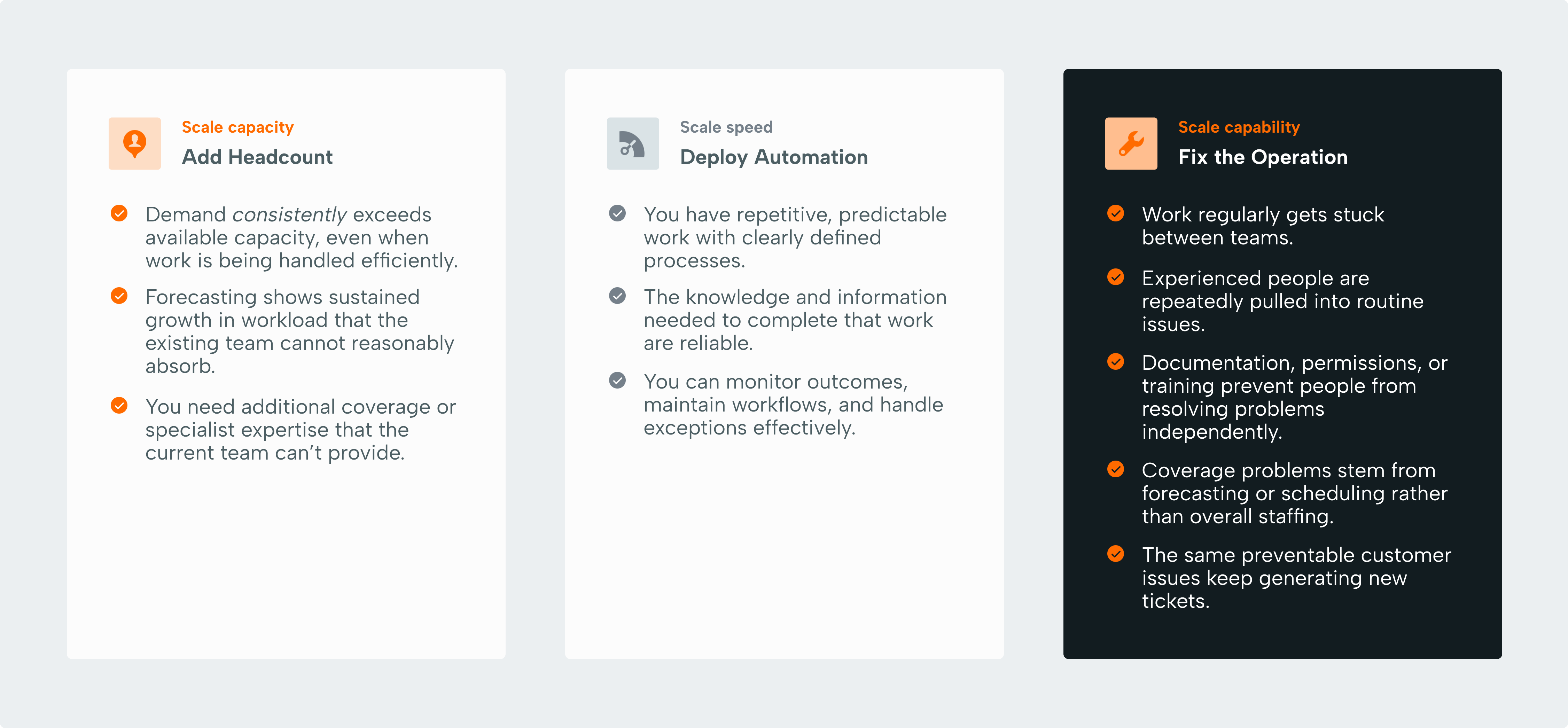
In reality, most growing SaaS companies will need some combination of all three. If you understand where the friction is coming from, you can make much better decisions about which investments will actually help.
Is your CX operation getting in its own way?
Figuring out what your CX operation actually needs can be surprisingly difficult, especially when different problems produce the same symptoms.
That's where a fresh perspective can help.
Our free, expert-led CX audit takes a closer look at how your operation works today, from capacity and coverage to knowledge, processes, technology, performance, and AI readiness.
We'll help you identify what's working, where things are getting stuck, and which improvements are worth prioritizing before you commit to another round of hiring or a new tool.
No obligation, no predetermined solution. Just a clearer picture of what your CX operation needs to work better.
Related posts
Channel orchestration without chaos: building omnichannel CX that actually works
Customers experience one relationship. Most companies manage six disconnected systems. Here's how to build omnichannel CX that actually works.
Why BPO partnerships fail (and how to avoid the most common traps)
Think your BPO failed because of the vendor? Maybe. But most outsourcing failures start earlier. Here’s what actually goes wrong and how to avoid it.

The CX systems transformation layer: why running the operation isn't enough
Your support operation might be running beautifully, but that doesn't necessarily mean the system underneath it is. Here's why the difference matters.